Today Apple released iOS 12.2, so we wanted to mention that we’ve been testing with this latest update and forScore users should feel free to install it whenever they’re ready. In fact, there are two notable improvements made to this version that we wanted to call out.
First, this update fixes a system-wide issue when exporting PDFs that could cause semi-transparent annotations (like those made with default highlighter preset) to appear darker than normal, and could show artifacts especially around white markings.
This update also unexpectedly adds support for the Logitech Crayon to the latest generation of iPad Pros, the 11-inch and 12.9-inch (3rd generation). In our testing, we found them to be a great rugged alternative with few downsides. If you’ve got an iPad Pro and couldn’t justify the price of the Apple Pencil 2, this cheaper alternative definitely deserves a look.

Logitech’s Crayon doesn’t support pressure sensitivity, but it does support tilt and otherwise works similarly to the first generation Apple Pencil. The cap is built in so you can’t lose it, it charges with a cable so there’s no need to awkwardly plug it in to the bottom of your iPad, and it doesn’t require pairing so it’s even easier to set up. It’s a utilitarian tool that in many ways makes up for some of the more curious choices Apple made with their first Pencil, and overall it’s a great option that we’re happy to recommend.
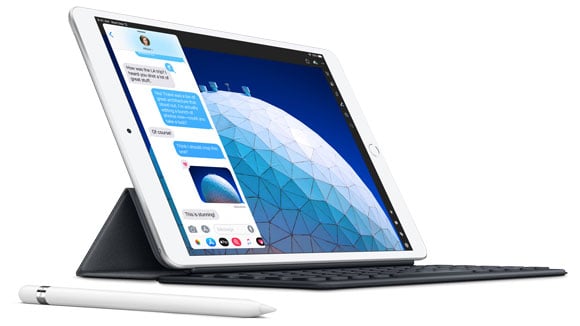
Today Apple introduced two new iPads and while their lineup has never been more complicated, there have also never been so many great options for customers to find one that best suits their needs. While we haven’t yet been able to test them, we expect that forScore will be fully compatible with the two newest models right out of the box. Their form factors and screen sizes aren’t new, and every major hardware feature (like Apple Pencil support) has been previously available in other devices, so there shouldn’t be any surprises.
There was a time when Apple’s product refreshes offered a new vision for their lineup: these older things are gone now, and they’re being replaced by better ones. Now, products slip downward from tier to tier as they age, with Apple continuing to offer them for lower prices or in select markets. It’s not as exciting, but in the end it’s a great thing for users. Whether you’re looking to get started with your first device or thinking of upgrading an older one, now’s a great time to check out Apple’s latest offerings.
If you’ve been interested in trying out forScore or seeing what the latest and greatest iPads have to offer, there’s never been a better time to head down to your local Apple retail store or third-party reseller. At many locations worldwide, including stores like Best Buy, forScore is currently featured on demo iPad Pros so you can see it in action and test it out for yourself. Where available, it’s also a great opportunity to try annotating with the new Apple Pencil 2 and using its double tap gesture.
We’re incredibly honored and thrilled to have been chosen to appear alongside many other amazing apps in this setting, and we think a lot of curious musicians will really benefit from the chance to experience it firsthand.

We’ve been getting a few common questions concerning recent changes to the Services panel, so today we’re going to answer them publicly. If your questions or concerns aren’t addressed here, please get in touch with us here so we can help further.
Which service should I switch to?
None! The Files app lets you access all of the services that have ever been available in the Services panel (and a whole lot more) so you don’t need to switch to a new one.
How will I access my content on a computer or from other devices?
Although it’s primarily designed to give you access to your iCloud Drive account, the Files app isn’t a different service—it’s an iOS interface. By connecting the Files app to Google Drive, Microsoft OneDrive, or any other third-party service, you gain the ability to access content stored on those services through the Files interface system-wide. When you’re on another device, like a computer, you can still access Google Drive (or whichever service you use) just like you always have. Your content doesn’t move anywhere.
Will Dropbox or Box be moved to the Files app too?
You can use both services with the Files app, but we have no plans to remove either account type from the Services panel. As long as these companies offer reasonable APIs, we’ll do everything we can to support them just as we always have.
Do I have to use the Files option in the Services panel?
No, there are several different ways to interact with the Files interface. If your device supports it, use Drag and Drop gestures and either the Slide Over or Split View multitasking modes. Or, use standard iOS share sheets to copy files into or out of forScore. With our next major update, we’ll be including an import button in the main menu that’ll give you quick access to the Files interface whenever you need to add something to your forScore library.
Is this decision permanent?
Yes, Apple has made clear that the Files interface is their preferred way of allowing users to access their content across all of their apps. As we continue to release updates, we’ll keep working hard to re-think some of our assumptions and to better align forScore with this new model, making it easier and simpler for our customers to manage their content so they can get back to what matters most: their music.
What if it doesn’t work for me?
Learning a whole new way of working with your content is daunting, we know. Most of our customers who have contacted us with misgivings were convinced immediately after they tried it for themselves. Step by step guides like the one we published a few weeks ago are long and pedantic and look intimidating, but spend a few minutes setting it up and you’ll see how much better it can be. You really just have to try it for yourself.
February 1, 2019
| Feature of the Week
For today’s feature, we’re taking a slight detour to point out something not within forScore, but right here on the website. We just rolled out a big update, and you can now search for posts within specific categories. Head over to the main Feature of the Week page and click the search icon in the top right-hand corner to try it out.
We’ll be taking some time off to work on the next big thing, but with almost 200 Feature of the Week articles and this new search functionality you’re bound to find something new to read between now and then!