forScore 15.2Available Now
Let’s get to work.
Your sheet music library is an evolving collection that’s meant to be used and revised as your skills grow and your needs change. Edits should be easy, natural, and reversible whenever possible. This year, we’re putting more power at your fingertips while also making forScore available to millions of musicians for the first time.
Design
Apple spent the last year refining their new Liquid Glass design language and it really shows. We’ve taken that work and elevated forScore’s look and feel as well, ensuring our app fits right in and continues to offer a great, consistent experience across all platforms.
Each year, we also look for opportunities to modernize our code and replace older components with their modern counterparts. These under the hood changes ensure that forScore is in its best possible shape going forward.
In particular, we’ve significantly overhauled forScore’s Services panel using a split view layout and retired our old custom prompts and log sheets in favor of standard interface elements. It offers all of the same functionality and then some in a more familiar way.
Editing
The metadata panel, setlist editor, setlist and setlist folder inspectors, and MIDI preset editor now all feature separate cancel and done buttons so you can close without saving your changes if you need to. If any changes have been made, you’ll be alerted to confirm before proceeding so you don’t accidentally lose your edits.
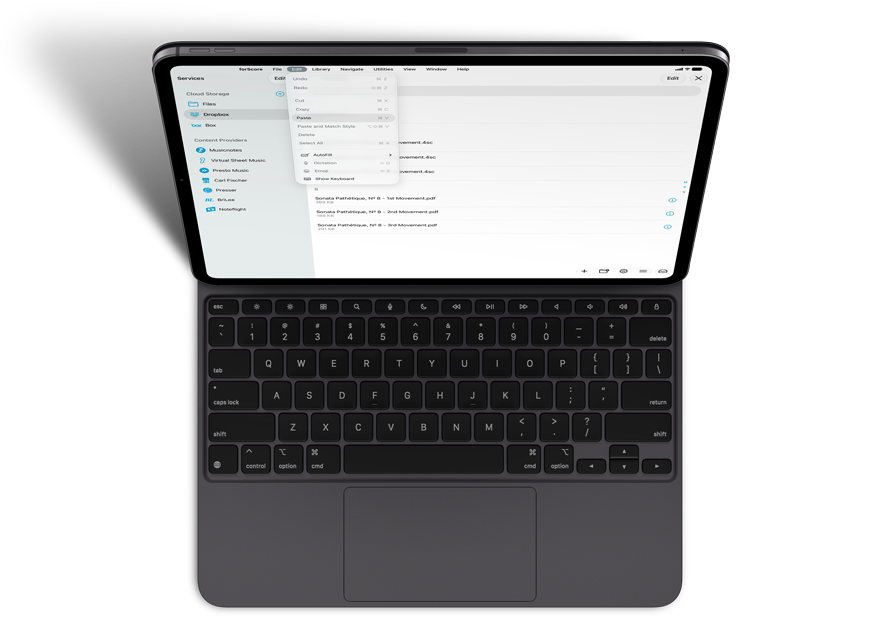
We’ve also added support for cut, copy, and paste commands in menus and more. Use the menu bar, contextual menus, or familiar keyboard shortcuts to copy and paste items into setlists or as a new setlist, and to copy and paste setlists to duplicate them (into any folder). Use these commands in annotation mode when using the selection tool or cut, copy, and paste entire layer contents in the Layers list.
Menus
Filters are a great way to narrow down a list of scores by certain criteria, and libraries make high-level organization a breeze. This year we’re answering a common user request and adding the ability to filter by library membership—including “no libraries” so you can find anything that you haven’t finished organizing.
The Libraries list has also been modernized and now offers the ability to sort manually or by title and permits multiple selection if you need to remove several libraries at once.
Languages
This year marks our biggest expansion of language support ever with seven entirely new languages: Arabic, Hebrew, Indonesian, Polish, Thai, Turkish, and Vietnamese. We’re also shipping three variants for English (UK), Portuguese (Brazil), and Spanish (Latin America).
Supporting right-to-left languages like Arabic and Hebrew meant combing through our interface and ensuring all content flows correctly and logically. We even added support for reversing page turns, independent of which language you’re using.
We’re so proud to serve musicians from all over the world and we’re very excited to be able to offer our app to even more people around the globe.
Partial Turns
Introduced all the way back in 2010 with forScore 2.0, half-page turns have been one of our most popular features ever since. With forScore 15.2, you can also use these partial turns while viewing one page in landscape orientation or wider portrait aspect ratios as long as the ‘best fit’ display mode is selected.
While viewing multiple pages, we’ve created a new kind of partial page turn that keeps the trailing page visible while showing the next leading page or pages. It works just like half page turns, except the divider isn’t moveable.

Available Now.
forScore 15.2 and all of these amazing upgrades are available now for iOS, iPadOS, macOS, and visionOS. forScore 15.2 is a free update for all existing users, available across all supported platforms at no additional charge. Get it today on the App Store, and be sure to check out our news page or use our RSS feed to follow our latest news and announcements.


for iOS & iPadOSfor macOS
for iOS & iPadOSfor macOS