
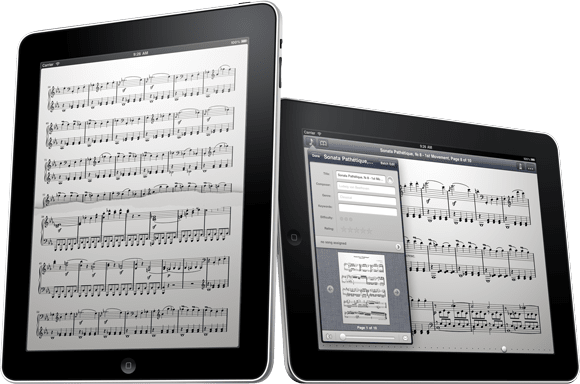
Ten years ago this month Steve Jobs unveiled the original iPad, and this April will mark ten years since the iPad 1 went on sale. As one of the first apps for iPad, we’ll also be celebrating this April and marking a full decade since forScore 1.0 was released.
Back in 2015, we put together a retrospective to illustrate just how far we’d come, but forScore’s visual changes were far more striking during those first few years and we wanted to take a different approach to commemorate our app this time around. Instead, we’re doing a few different things: we’re assembling a Spotify playlist of songs made with forScore, featuring testimonials and anecdotes from our customers to celebrate the impact our app has had on their music, and more.
So we’re asking for your help! If you can, please visit forScore.co/submissions and see if there’s a way you’d like to participate and contribute (either way, feel free to share the link with friends). We’re very excited about this and it’s something we want to do together with our community—a celebration, not just some back-patting marketing initiative. We love making forScore and we cherish it not because of what it is, but because of what it enables musicians to do. We hope you’ll join us!
Update: We’re no longer accepting submissions for this project. To everyone who took the time to participate, thank you so much! We sincerely appreciate your kind words and support.
The holiday season is here and we’ll be taking some time off as we head into 2020. This has been a very big year for us and we can’t overstate just how thankful we are for our passionate users. We love making (and listening to) great music, and helping musicians do what they love is what keeps us going. Thank you.
Before we go, we wanted to take a moment to remind those who may not have seen this before that a great feature of Apple’s digital storefronts is the ability for someone to purchase content—like albums, movies, books, and apps—for other people. You can pay for the item, add a message, and even schedule the gift email to arrive on a specific date. When it arrives the recipient will get a download code that they can redeem with their own Apple account.
It’s a great way to send last-minute gifts, or to share an app you’ve enjoyed with someone who perhaps can’t afford or wouldn’t choose to buy it on their own. For more information on app gifting, check out this page on Apple’s website. Happy holidays!
Yesterday Apple released macOS 10.15 Catalina and, along with it, the work they’ve done to make it easier for iOS and iPadOS developers to bring their apps over to the Mac (called “Project Catalyst”). We used it to create Mac versions of five of our apps, including Nocturne and all four Music Box apps, which are available now on the Mac App Store.
Making these apps was exciting and rewarding and although it took a lot of work to get them out the door while also prepping forScore 11.1 and getting all of our other apps ready for iOS/iPadOS 13, we couldn’t be happier with the end results. Catalyst is yet another tool developers have at their disposal to make great apps that take advantage of Apple’s great hardware and operating systems.
Of course, a lot of people will naturally be curious about whether forScore could come to the Mac and what that would look like. For now, the answer is that we don’t know. We’ve made a lot of progress on a possible Mac version of forScore as a proof of concept, but it’s just not good enough—we’ve gone as far as we can go with the current state of these tools and we’ll need to wait a little longer for Apple to build out a few additional frameworks before we’d be comfortable considering shipping anything.
Project Catalyst may have a simple marketing name, but it entails a ton of work across many of Apple’s different teams and it’s a longer term effort than a single update can encompass. We’ll be keeping a close eye on things as they progress and we’ll ship a Mac version of forScore if and when the end result is a product we can be proud of and that musicians can take full advantage of. Until then, thanks as always for your enthusiasm and support.
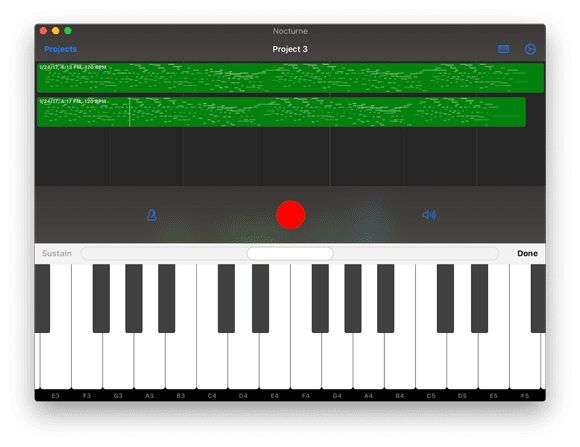
Today we’re pleased to announce that Nocturne, our single-track MIDI recorder for iOS and iPadOS, is available now on the Mac App Store as a standalone app for macOS 10.15 Catalina. We’re passionate about Nocturne and it’s just as great on the Mac as it has proven to be on iPhones and iPads: it gives musicians a streamlined, simple, fast way of recording their ideas as they come—no setup or waiting for sound banks to load, just hit record and go.
Available now on the Mac App Store
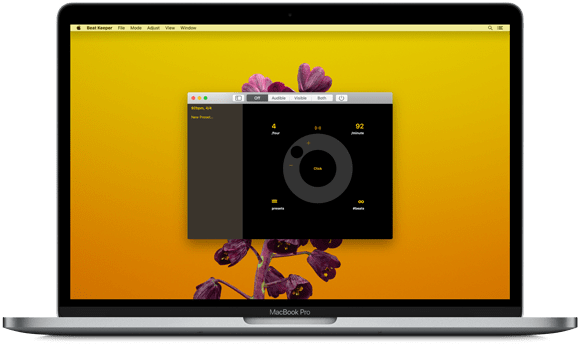
We love Macs and use them every day to make our apps, which is why we’re so excited to announce that we’re bringing all of our Music Box apps to macOS Catalina! All four apps are available today on the Mac App Store, exclusively for Macs running macOS 10.15 (a free update for all compatible Macs).
If you’ve used these apps on your mobile device they’ll seem very familiar, but with support for Mac-only features like the touch bar and menu bar. It’s great to be able to bring these utilities and accessories to the Mac and we think this is just the start of what’s possible.
Apple did a tremendous amount of work to enable developers to bring their iOS apps to the Mac, and it’s a thrill for us to be a part of this exciting debut. Be sure to check out Cue, Beat Keeper, Pitch Please!, and TuneWave on the Mac App Store today.
Available now
Available now
Available now
Available now


