September 19, 2019
| News
Earlier this year, Apple made a big announcement about iTunes: they’re discontinuing it on the Mac with macOS 10.15 (a free update coming in October). Instead, its responsibilities are being split up by media type into the new Music, TV, and Podcast apps. That’s left some of our users wondering about iTunes’ File Sharing panel, a long-standing tool used to copy files between an iPad or iPhone and a Mac, as well as the additional syncing functions previously offered by iTunes.
When macOS 10.15 ships later this year, those functions will all still be available, but they’ll be found within Finder instead (plug in your device, open a Finder window, then select your device from the sidebar). We’ve been beta testing macOS 10.15 all summer long, and while Apple hasn’t finished working on this transition, it’s been a painful one. The file sharing panel wasn’t available at all for months, and even now it’s incomplete, missing basic functionality like the ability to select multiple items.
We hope that Apple will make some progress on this front over the next several weeks and that the final version will be more complete, but we know that many of our users rely on this panel and we weren’t just willing to wait around with our fingers crossed. So we took matters into our own hands and built our own version of the File Sharing panel right into forScore Backup Utility. It works exclusively with forScore, but otherwise offers all of the same functionality and more: you can preview scores and even rename them without losing your annotations or metadata.
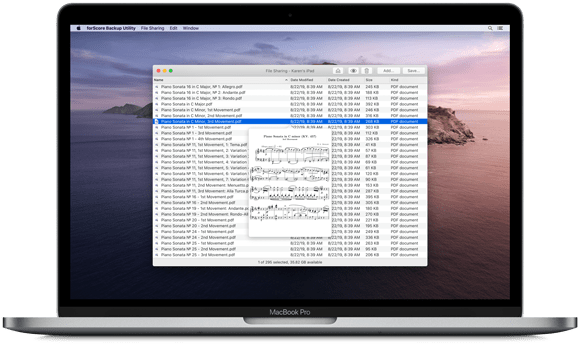
Some people think we have Apple’s ear, and unfortunately that’s just not the case. We know about as much concerning Apple’s plans as the average consumer does, so sometimes we have to make a tough call and put in the extra hours. In the end, though, we think we’ve created something valuable and we hope you find it to be every bit as capable (if not more) than the system functions it replaces.
forScore Backup Utility 1.1 is a free download for macOS 10.14 or higher, and the new File Sharing functions require forScore 11.1 or later.
Available now for macOS 10.14 or later
September 13, 2019
| News
With iOS 13 right around the corner and iPadOS 13 coming later this month, we’re getting ready for our next big forScore release and wanted to announce some upcoming changes to forScore’s minimum requirements that affects a small number of people: forScore 11.1 will require iOS 11 or later, meaning the iPad (4th generation), iPhone 5, and iPhone 5C will no longer be compatible.
Once we release forScore 11.1, new customers will not be able to purchase and install forScore on those devices. However, if you purchase forScore 11.0.4 now you’ll be able to continue using it as long as you like and you’ll also be able to re-download and install that version at any time if needed.
We’re proud to serve a wide range of musicians and we know that any update to our apps’ minimum requirements can become a barrier to some; we take these changes very seriously and only raise these requirements when we can no longer serve all of our customers adequately, as is the case now. We appreciate your understanding.
Updated 9/18: A previous version of this post stated that forScore 11.1 would require iOS 12 or later due to a major issue with Apple’s developer toolkit—this issue has since been resolved. As a result, forScore 11.1 will require iOS 11 or later and not iOS 12 as previously stated.
September 12, 2019
| News
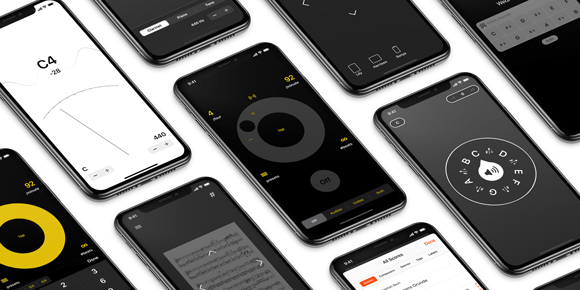
Today we’re proud to announce the immediate availability of free updates to all of our Music Box apps: Pitch, Please!, Beat Keeper, Cue, and TuneWave. Each of these apps has been optimized for iOS 13 and iPadOS 13, TuneWave and Cue now take advantage of Dark Mode, Beat Keeper and Pitch, Please! feature home screen shortcuts and expanded support for keyboard commands, and more.
All of these apps are available for purchase separately or at a discount as part of the forScore Music Box bundle, and of course all four updates are totally free for all existing users so be sure to check them out on the App Store!
Available now
Available now
Available now
Available now
September 12, 2019
| News
Nocturne 1.2, the latest free update to our MIDI recorder, is available now on the App Store. Optimized for iOS 13 and iPadOS 13, Nocturne takes advantage of new system features like contextual menus to provide easier project management and sharing. This update now supports drag and drop gestures so you can move tracks between projects and, on iPad, import or export MIDI files from/to other apps. Version 1.2 also adds keyboard shortcuts so you can instantly access most of Nocturne’s common functions and settings (hold the command key to see all of the available commands).
Available now for iPhone, iPad, and iPod Touch on the App Store.
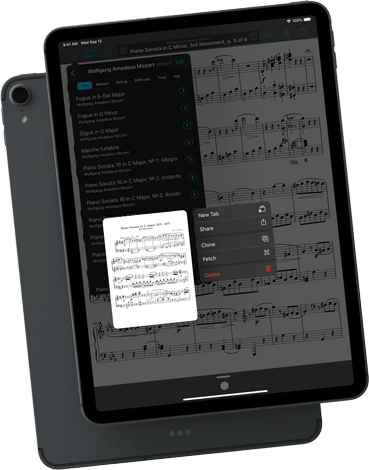
Today we’re very excited to give you a sneak peek at our next major version of forScore, version 11.1. This free update packs a lot in, thanks in part to the hard work Apple is doing to push iOS forward. From dark mode to contextual menus, we’ve adopted the latest and greatest enhancements and spent months tweaking things to get them just right in time for iOS 13’s release, most likely coming next month if history is any indication.
We’re jumping in on day one with iOS 13, but all users will benefit from many other great enhancements like expanded keyboard shortcuts, copy and paste support for annotation layers, and the ability to switch annotation tools with Apple Pencil 2’s double tap gesture even when you’re not in annotation mode.
There’s even more for forScore Pro subscribers, though: users with a device sporting Apple’s TrueDepth camera system can put those sensors to good use with our brand new face gestures that let you turn the page with head or mouth movements. It’s not an experimental feature, these gestures are powered by a highly refined system designed from the ground up to work for a wide range of musicians. We can’t wait for our Pro subscribers to try it out.
Check out all of the new features here and, if you’re able, consider becoming a beta tester to try out early versions and help us work through any remaining bugs that pop up as Apple continues testing and rolling out their own updates.
Thanks to all of our customers for helping us create the best version of forScore yet, we can’t wait to release it and other exciting updates later this year!
forScore 11.1 Sneak Peek


