November 23, 2018
| Feature of the Week
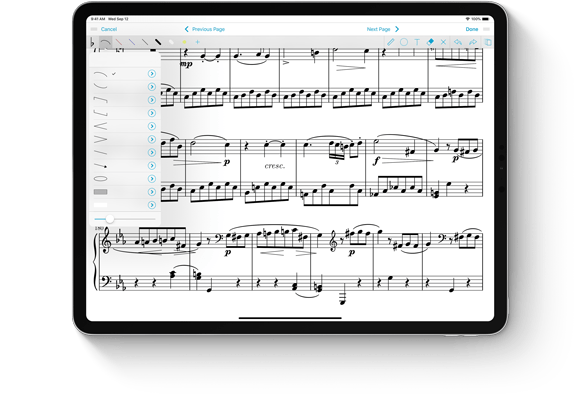
When you want to add certain types of markings to a page, Stamps are often the right choice, but for dynamic markings such as slurs they just aren’t flexible enough. For those situations we created the Shapes tool which lets you draw certain common markings that need to be different sizes and aspect ratios.
There are two new shapes to choose from in forScore 10.5, an arrow and an oval (the two most commonly requested ones). Just like other shapes, you can use the resizing slider to change their thickness or tint them to the perfect color.
Out of the original set of shapes, the rectangle has always been a bit of an outlier: created to allow people to blank out sections of a page they don’t need, the rectangle is filled instead of outlined. Now, with our latest updates, you can choose either style for the rectangle and the new oval shape. Tap the circled arrow button next to either shape to see the tint color picker, and use the new tab bar along the bottom to show these new shape settings. There’s also a setting for the staff shape that allows you to specify the number of horizontal lines drawn.
November 16, 2018
| Feature of the Week
With forScore’s Rearrange tool, you get complete control over a document’s layout: reorder, rotate, remove, duplicate pages, and insert pages from a template, from another item in your forScore library, or even from a PDF file dragged into the Rearrange panel from another app.
All of that power needs a great interface that’s easy to use, and in forScore 10.5 we made one change that really helps push things forward. Now, instead of just moving one page around at a time, you can drag multiple pages and move them all to another spot quickly and easily.
Begin by dragging a page with one finger, then tap additional pages with any other finger to add them to your drag stack. When you drop the stack, all of those pages are placed at the new position in the same order you used to pick them up. If you start dragging multiple files and change your mind or pick up a wrong page, tap the red Cancel button and all of the pages you’re dragging will go back to their original location.
November 9, 2018
| Feature of the Week
We’re back, and what a week it’s been! Apple’s latest iPad Pros are available now, with their expansive screens and gorgeous new design. We updated all of our apps on Monday for these new devices, so you’ll be ready to jump right in if you’re upgrading.
Apple Pencil got an upgrade too, and forScore is ready to help you take full advantage of its new double tap gesture. In iOS’ Settings app, you can choose how this gesture should work in general, with options called “switch between current tool and eraser,” “switch between current tool and last used,” “show color palette,” or “off.” App developers are encouraged to follow these guidelines as closely as they can, ensuring that the results of a double tap remain intuitive, but Apple lets developers decide how best to apply these concepts to their own apps.
While annotating in forScore 10.5, the first two options work as you might expect: double tapping your pencil switches between the currently selected tool and the eraser, or between the current tool and the last used tool. Since forScore doesn’t have a universal color picker for each of its tools, the third option opens the current tool’s detail view instead, if applicable. If the Stamps tool is selected, for instance, double tapping shows the Stamps palette, or if a drawing preset is selected it opens the preset editor. If you prefer, you can turn off support for these gestures by choosing “off” in the Settings app.
When you’re not in annotation mode this gesture does nothing by default, but you can change that if you prefer—open forScore’s settings panel and choose “Page Turners & Shortcuts” to select a common tool or action, then double tap your Pencil to associate that action with the new gesture.
Some people think app developers get advance knowledge of major hardware changes, and while that can be true for some of the biggest names out there, in most cases developers like us only find out about new devices the same time you do. Sometimes they’re released the same day they’re announced, and other times we get a few days to get ready. It’s a mad rush each time, but we work very hard to support each new iPad on day one and we’re proud to say that’s true this time. We love music and we love new iPads, and if you’re in the market for one of these devices we think you’ll be very happy with your upgrade.

Today we’re thrilled to announce the immediate release of our latest major update to forScore, version 10.5. It’s a big update in more ways than one: we’ve optimized forScore for the latest iPad Pros with ultra slim bezels, Face ID, and no home button. The expansive screens on these new devices are incredible and we know the forScore experience will grow right along with it.
That’s just the tip of the iceberg, though, because forScore 10.5 also supports the new Apple Pencil and its double tap gesture. While annotating, use this gesture to switch between the current tool and the eraser, between the current and last used tool, or to show the current tool’s detail view. When you’re done annotating, assign the gesture to one of forScore’s other functions or tools for instant access from anywhere.
Whether you’re upgrading to a new iPad on day one or not, there’s a lot more for everyone in this update. New shapes and shape settings, a streamlined “prevent finger drawing” option, the ability to move multiple pages at once in the Rearrange panel, filter improvements, and the ability to recover recently deleted scores and setlists make this the most incredible version of forScore yet. Learn more about all of these changes and more here.
And, just as always, it’s completely free for all existing users. Check out forScore 10.5 and forScore mini 3.5 today on the App Store, and thanks once more to all of our amazing beta testers who helped us get this release ready for prime time.
Available now for iPad
Available now for iPhone and iPod Touch
Earlier this year we introduced 4SB Archives which let you export all of your scores, bookmarks, setlists, annotations, settings, and more as a single file that can be copied to a computer or uploaded to your preferred cloud service. Since archives duplicate all of your files they’re much larger than 4SB Backups. If your device is running low on storage space you may not always be able to create them, and that’s where our newest app comes in.
We’re very excited to introduce forScore Backup Utility, a free app for macOS 10.13 or later that lets you archive your forScore library directly to a Mac using your device’s USB cable. Since forScore securely transfers your information one chunk at a time, the complete archive is never actually stored on your device. If you need to restore from a backup, the process works similarly but in reverse. It works with forScore 10.5 or later and forScore mini 3.5 or later, both available now.
It’s fast, easy to use, and completely free. You can learn more about it here, and if you missed it be sure to check out everything else that’s new in today’s forScore updates.
Available now for macOS 10.13 or later

