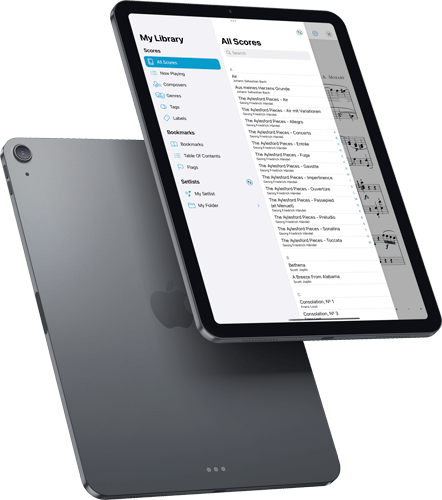
Today we’re very excited to give you a sneak peek at forScore 13, coming later this year along with iOS 15, iPadOS 15, and macOS 12. Featuring a significant design overhaul, page flags, iCloud syncing for everyone, Shortcuts, and multi-window support that showcases a brand new interface built from the ground up using the latest technologies and standards, it really raises the bar and helps you get the most out of your digital music library.
forScore 13 will be released later this year along with Apple’s major OS updates, but you can try it out for yourself today by becoming a beta tester. Otherwise, be sure to check back soon as we head into the most exciting time of the year!
forScore 13 Sneak Peek
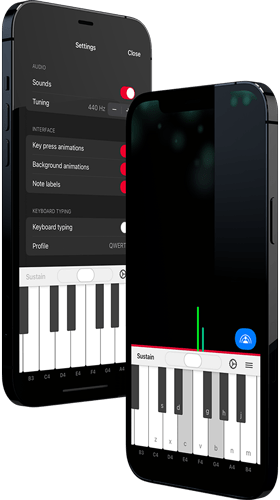
Over the past few months we’ve been working on a brand new app based on forScore’s on-screen piano keyboard, called Piano with Friends. This standalone version includes the same great features like a high quality sound bank, fine tuning, note labels, and MIDI support, but it also includes some new features that really make it deserving of its own app.
First, it supports typing input so you can play by pressing keys on a standard computer keyboard. There are several built-in layouts, but it also supports custom configurations so you can use it no matter which kind of keyboard you have. It’s the first of its kind that we’ve seen and we think it provides a great and highly flexible solution for everyone.
Piano with Friends, as the title hints, supports Apple’s forthcoming SharePlay feature which allows you to participate in group activities while on a FaceTime call. That means you can play piano with anyone, anywhere in the world.
All of that and more will be coming soon to iOS, iPadOS, and macOS, but we’re ready to start beta testing today. Just click this link to join our public beta and let us know what you think, or click below to learn more about our newest app.
Update: beta testing for this app has now ended, and Piano with Friends is available now on the App Store for iOS, iPadOS, and macOS as a single universal purchase.
Learn More
Today we’re proud to announce the release of forScore 12.1 with iCloud Syncing, available first to forScore Pro subscribers as part of their Early Access benefits. This update actually includes a ton of other improvements and enhancements for everyone, though, so we wanted to take a moment to point out a few of them:
Contextual Menus: Apple designed touch-compatible contextual menus to work with single items, but this limitation always seemed unnecessary to us. With forScore 12.1 we’ve managed to improve this—everywhere that forScore supports edit mode and multiple item selection, you can now pick two or more items and then tap and hold any one of them (or right click on it) to work with all of those items at once. We’ve also added a contextual menu to the title bar display so you can quickly perform common tasks with the current item.
Show In Library: One of the actions in the title bar’s new contextual menu is “Show In Library” and it reopens whichever menu you used to navigate to the current score. For instance, if you choose a score from the composer “Mozart” and later navigate to the “Classical” genre, this action reopens the Score menu and returns you to the “Mozart” list, scrolling to the current item and highlighting it for you. This new action is also available for configuration via the Page Turners & Shortcuts and Gestures settings panels.
Mac Upgrades: Late last year we introduced forScore for Mac and we’ve been working furiously ever since to make it even better. We brought one of forScore 12’s biggest new features, enhanced support for external displays, to the Mac by making it open up a secondary window that you can move to any monitor. We fine-tuned performance, squished bugs, made the sidebar resizable, and added subtle hover effects to a number of interface elements to make them feel more natural when used with a cursor.
Improvements: We spent most of our time working hard to build iCloud Syncing, but we also intentionally focused on “quality of life” improvements—little touches that really add up. We adopted iOS/iPadOS 14’s pull-down menus in more places, enhanced setlist pickers to use folder-based navigation, and we added right-click menus to the page and even to the tab bar so you can do many of the same things we discussed earlier but for any item open in a tab. Finally, we made changes to our default settings that will help mitigate the the worst effects of a system bug that Apple still hasn’t fixed a year later; hopefully that saga ends soon.
All of these changes and many others add up to the best version of forScore yet—still offered as a free upgrade for all users. Thank you all for your tremendous support and feedback!
Available now for iPad, Mac, iPhone, and iPod Touch
March 9, 2021
Uncategorized
With iCloud Syncing, forScore can automatically keep your sheet music library up to date across all of your devices.
Setup
To set up syncing, start with your device that contains the most complete and up-to-date music library. Choose Sync from the Tools menu and tap “Sync with iCloud” to enable it. Next, you’ll have to choose how to handle conflicts with any data already on the server, if applicable: in general, you should choose “Prefer Device Versions” on your primary device, and choose “Prefer iCloud Versions” from other devices that may not yet contain complete copies of your library.
Once you’ve completed syncing from your primary device, repeat these steps on your other devices. Note that your choice to prefer device or iCloud versions of your data is only necessary when enabling syncing—from then on, forScore has enough information to resolve conflicts automatically.
Syncing Content
Syncing happens automatically as you make changes to your library and as efficiently as possible depending on your connection type, server availability, and other factors. Changes are typically synced in less than a minute but may be delayed in some cases; to request that forScore begin syncing immediately, open the Sync panel and drag the view downward until the refresh control starts spinning. Return to this view at any time to see when the last successful sync was completed.
Currently, forScore syncs your music library and content (your sheet music, bookmarks, setlists, metadata, annotations, recordings, and more). Settings are not synced, however, since many people choose to use slightly different configurations on different devices to get the most out of each form factor. Due to privacy considerations, Dashboard data is not currently synced across devices.
Status & Error Messages
As with any network-dependent service, iCloud Syncing sometimes encounters issues that temporarily prevent it from completing its work. This is a normal part of the process and usually resolves itself after a short while. In other cases, syncing may not be able to proceed until you take additional action (in this case you’ll see a red exclamation mark next to the Sync entry in the tools menu).
iCloud Accounts & Storage
forScore uses your personal iCloud account to store its data and keep your content up to date across all devices. For multiple devices to share the same forScore library, they must be logged into the same iCloud account. This feature does not facilitate sharing content between different accounts (even those that use Family Sharing).
Apple’s iCloud service provides different storage plans, and you will not be able to use forScore’s syncing functionality if your account does not have sufficient storage. iCloud accounts, storage plans, and payments are all handled exclusively by Apple.
Backups
forScore stores its synced documents in iCloud, but in a separate location from Apple’s whole-device backups. If you use iCloud Backup to back up your device(s) and you also plan to use forScore’s syncing feature, you may not have sufficient storage space to accommodate both. If needed, forScore can indicate to the system that its documents should no longer be included in future whole-device backups. This increases the risk of data loss, but ensures that only the synced copies of your forScore files exist in iCloud. In this case, it’s imperative that you manually back up your data to a safe, non-synced location in case your data is corrupted or lost. Once a change is synced across your devices, this is the only way to ensure that you can revert to a previous state.
Privacy
All of your data is stored by Apple using your iCloud account and as such is governed by their policies and terms of service. We do not maintain user accounts of any kind, and we do not analyze or share your content with any other party at any time.
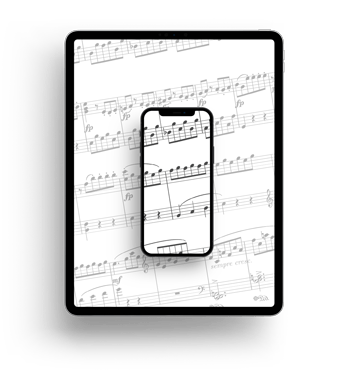
Today we’re proud to give you a first look at forScore 12.1, one of our most important updates ever with just one major new feature: iCloud Syncing.
Built upon years of hard work and with the utmost priority for ensuring that your music is always instantly available, forScore’s syncing engine coordinates with all of your devices to keep your music up to date automatically. It stores a complete copy of your library on each device, so there’s no need to wait for something to download when you want to play it.
We’ve been testing iCloud Syncing with our beta program, and now we’re getting ready to start rolling it out to everyone. To ensure that it’s fully optimized for all of our users, iCloud Syncing will be offered first as an Early Access feature for forScore Pro subscribers, and will be coming to all users later this year.
This feature has been high on many musicians’ wish lists since iCloud was unveiled years ago, and we worked hard to deliver the most reliable, sophisticated solution we could. It took far longer than expected, and we sincerely appreciate your support—it got us here today and ensures we can continue onward for years to come. Thank you!
forScore 12.1 Sneak Peek

