November 11, 2014
| In Depth
The iPad was designed for fingertips, plain and simple, but that hasn’t stopped countless companies from creating input devices of all shapes and sizes. Over time, they’ve gotten bigger and smaller, smarter and simpler, and this summer we sat down to see if we could take advantage of some of them to improve forScore’s annotation experience with version 8.0.
Of course, the majority of these products work right out of the box. They’re basically capacitive sponges on sticks, and that’s that. To really make a meaningful impact, though, they also need to communicate with the iPad to offer additional features like palm rejection, and the best way to do that is with Bluetooth Smart (aka Bluetooth LE, Bluetooth 4.0). That narrowed things down for us, and we identified three companies that offered something we thought could help our users: Adonit, FiftyThree, and Ten One Design. (more…)
November 3, 2014
| In Depth, News
In the summer of 2012, over two years ago now, forScore 4 had just hit the App Store and we were beginning to transition forScore over to Core Data. iOS 6 had just been announced, and Apple Maps was gearing up to make waves that still haven’t completely settled down. Since then, we’ve released forScore 5, 6, 7, and now 8, but that’s only half of the story.
This is the story of forScore mini: how we created it, why, and how it reflects the shifts in Apple’s strategy and its priorities. (more…)
We’re very excited to announce that forScore has gone on sale for the first time ever as part of the App Store’s Explore Your Creativity promotion. We’ve never had a sale before, but we just couldn’t miss this opportunity to help even more musicians make the switch to digital sheet music. Right now you can get forScore for a whopping 50% off, but hurry—it won’t last long! Get forScore here and be sure to check out all of the great apps on sale.
Update: This promotion has now ended.
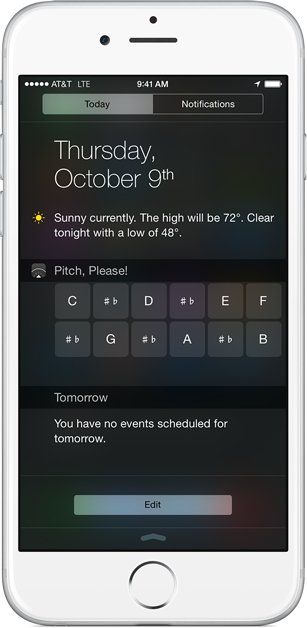 The pitch pipe widget that we introduced with forScore 8 has proven to be a big hit, and it wasn’t long after people started using it that our suggestion box began filling up with requests for bringing something similar to the small-screen version of our pitch pipe, Pitch, Please! We listened, and with today’s update to version 2.3 we’re doing exactly that.
The widget relies on the app’s settings, so you can simply set the sound, octave, and tone that you want to use within the app, then get instant access to the note you need from just about anywhere. Those settings get pushed from the app to the widget, not the other way around, so you may not hear anything until you run the app and change the octave and sound settings at least once.
Other than that, it’s identical to the iPad version except that it uses two rows of buttons instead of one. It’s a fun and handy enhancement to a great tool, and we think you’ll love it. Check out Pitch, Please! 2.3 on the app store today!
Update: forScore 8.0.4 is available now, please update if you’re using iOS 8.
We work hard to ensure that major updates go as smoothly as possible—both forScore updates and iOS updates. This year, like every year, we downloaded each of the iOS betas on day one and worked incredibly hard to accommodate changes and keep an eye out for bugs. Unfortunately, some issues just don’t come to light until everything goes live. For our users running iOS 8, one particular problem has surfaced and we wanted to take some time to explain what it is, why it happened, and what we’ve done to fix it.
Some users have found that when they turn from one page of a score to the next, what they actually see is a page from a completely different score. With the help of some very patient beta testers, we were able to determine that the problem comes down to one of the most basic parts of iOS itself: user preferences. Most developers use this system to store your settings and environmental information (in our case, the name of the file you’re looking at). In iOS 8, these values occasionally revert to an earlier state without warning.
To be clear, this isn’t an issue with our major forScore 8.0 update. In fact, we’ve had very few issues related to new or updated features. It’s a problem with iOS, and ultimately Apple will need to fix it. Until then, however, we’ve relocated the information we rely on most to mitigate the worst symptoms of this problem. Our 8.0.2 update, which was submitted before we were able to track down this issue, has already been in review for almost two weeks, so we’re waiting for it to be approved before we submit 8.0.3 with these fixes. We’ll be requesting an expedited review for 8.0.3, since this problem is so severe, and we hope to have everything sorted out soon.
We can’t change the fact that these issues exist, but we can and are doing everything we can to respond to them swiftly. Thank you for your patience and continued support.